🔧 Need a hand with your tech? Give us a bell: 📞 0474 635 482  ·  Flick us an email: help@errorfix4u.com  ·  ● Also available after hours, weekends & public holidays

MacBook & iMac Data Backup & Transfer in Adelaide

Set up Time Machine or iCloud backup and seamlessly transfer all your data to a new MacBook or iMac — files, apps, and settings intact.

Apple Data Backup and Transfer
Time MachineiCloud BackupMigration AssistantMacBook & iMac
💿

MacBook & iMac Data Backup & Transfer

  • Apple-certified Mac technicians
  • MacBook & iMac all models
  • Transparent pricing, no hidden fees
  • 90-days Warranty* on all work
  • 7 days a week availability
📅 Book This Service

What's Included in This Service

Here's exactly what our technicians do when you book MacBook & iMac Data Backup & Transfer with ErrorFix4U.

01

Data Audit

We review everything on your Mac — photos, documents, apps, emails, and settings — to ensure nothing gets left behind during the transfer.

02

Backup Setup

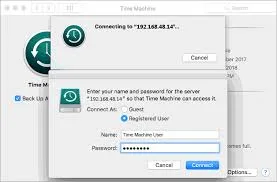
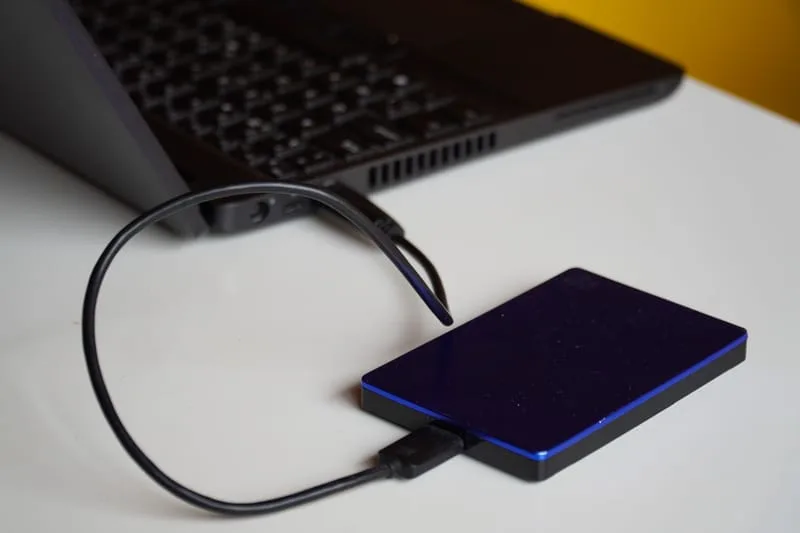
We configure Time Machine to an external drive and/or iCloud for automatic, ongoing protection of all your Mac data.

03

Full Data Transfer

Using Apple Migration Assistant and manual transfer where needed, we move all your files, apps, and user settings to the new Mac.

04

Application Reinstallation

We reinstall all required apps on your new Mac and ensure licences and logins are transferred where possible.

05

Verification

We confirm every file, folder, and key application is working perfectly on the new Mac before we hand it back to you.

06

Ongoing Backup Advice

We walk you through how to monitor your backups and what to do if you ever need to restore data in the future.

Mac Data Backup Transfer in Adelaide - photo 1
Mac Data Backup Transfer in Adelaide - photo 2
Mac Data Backup Transfer in Adelaide - photo 3
Mac Data Backup Transfer in Adelaide - photo 4
Mac Data Backup Transfer in Adelaide - photo 5
Mac Data Backup Transfer in Adelaide - photo 1
Mac Data Backup Transfer in Adelaide - photo 2
Mac Data Backup Transfer in Adelaide - photo 3
Mac Data Backup Transfer in Adelaide - photo 4
Mac Data Backup Transfer in Adelaide - photo 5

Signs You Need Mac Backup & Transfer

Just bought a new Mac and need to move everything over
No current backup and worried about losing files
Time Machine drive is full or not working
Upgrading from an old Mac to a new one
Previous transfer attempt left missing files or apps
iCloud not syncing properly across your Apple devices
Mac being repaired and need data saved first
Business Mac being replaced and need all data migrated

Frequently Asked Questions

Everything you need to know about our MacBook & iMac Data Backup & Transfer service.

Can you transfer everything from my old Mac to a new one?
Yes — we transfer files, photos, apps, emails, browser bookmarks, user accounts, and system preferences using Apple Migration Assistant and manual methods.
Do I need to bring both Macs?
Ideally yes, but we can work with just your old Mac if you need a backup first. We can then transfer to the new Mac when you have it.
How long does a Mac data transfer take?
Most transfers take 1–4 hours depending on data size. Large libraries (100GB+) may take longer. We'll estimate upfront based on your storage usage.
Can you set up automatic backups so I never lose data again?
Absolutely. We set up Time Machine on an external drive plus iCloud for off-site protection — so your Mac is always backed up automatically.

Ready to Book MacBook & iMac Data Backup & Transfer?

Same-day service across Adelaide & South Australia — get a free quote in minutes.

Other Apple Services We Offer

ErrorFix4U covers every Apple Mac need. Explore our full range of services.

YOU MAY ALSO NEED

Related Services in Adelaide

Mac Data Recovery Mac Repair Slow Mac Tune-Up Mac Hardware Upgrade